Succession Toolkit
₹2,499one-time
Solve succession without writing code.
- A scored bench for every critical role, with readiness tiers
- Flight-risk reasons, scenarios, build or buy
- Council pack and a ten-sheet workbook
PeopleGraph reads the export your HRIS actually produces — duplicates, broken reporting lines, five spellings of one skill — fixes it on the way in, and answers the questions HR gets asked every quarter: who steps in if a critical role empties, what the organisation looks like, where attrition is coming from, which skills are thin, and what the workforce will look like in three years. It runs on your own computer; the file never leaves it.
Figures are from the synthetic sample below: 500 made-up employees, generated with Faker.
500 synthetic pharma employees. This is the same engine the toolkit runs on your own export — here it is frozen on the sample so you can click through every module before buying anything.
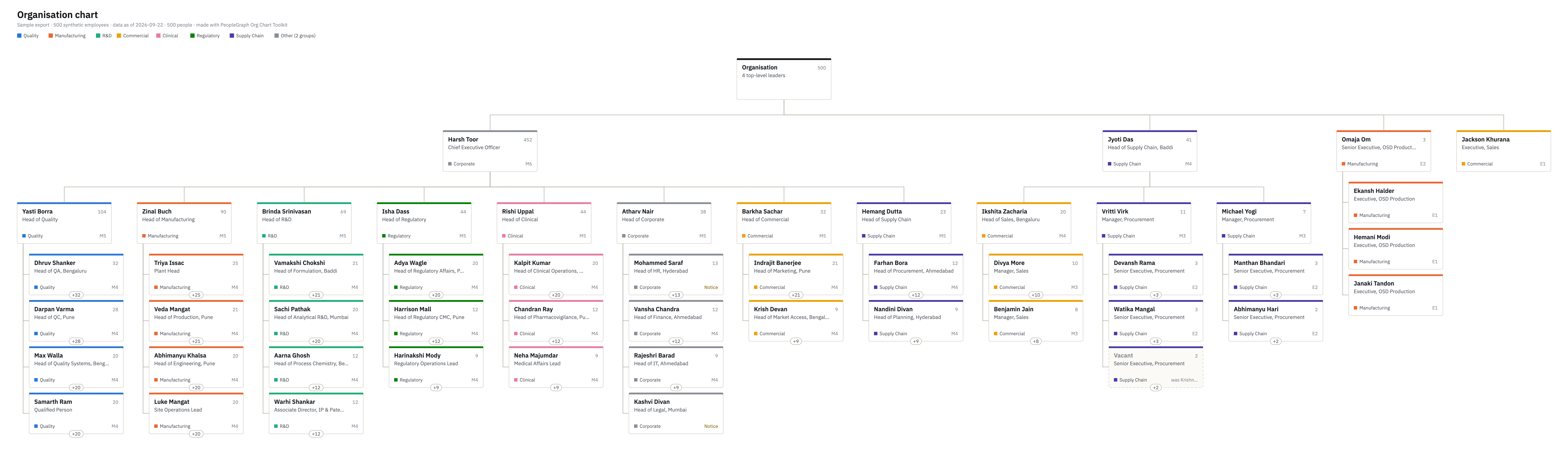
Duplicate people merged on date of birth and fuzzy name, reporting cycles broken, exited managers flagged, two grading systems and two potential scales mapped onto one, skill strings collapsed to a single vocabulary. Every fix is listed, none are silent.
Nodes for each, edges for reports to, holds role, has skill and based at. Succession, skills, org design and hiring are all queries against this one structure, which is why they never disagree with each other.
Role similarity 35%, skill coverage 30%, band gap 15%, calibrated rating 10%, time in role 10%. Every candidate card shows its own breakdown, so a talent council can argue with the number instead of taking it on faith. No AI model, no black box.
Each toolkit is a single page you double-click: no install, no login, no upload. All five read the same export and the same template. Every 1.x update is free.
₹2,499one-time
Solve succession without writing code.
₹1,499one-time
Draw the organisation from the export you have.
₹1,499one-time
Headcount, attrition and who is in the building.
₹1,499one-time
What your people can do, and where it is thin.
₹1,999one-time
Your workforce in one, two and three years.
All five toolkits, ₹4,999 instead of ₹8,995. One download, one licence, the same template for all of them.
Buy all five₹0Apache 2.0
Learn, experiment, build. The resolution engine and graph, in Python.
View on GitHubScopedper organisation
Connected to your HRIS, your role architecture and skills vocabulary, multi-user, deployed inside your walls.
Talk to usThe resolution engine is open: read it, run it, extend it for your HRIS. It is genuinely useful on its own — most people analytics starts with the afternoon of cleaning it does in a second.
Intake, skills supply, org design and the nine-box, as a Streamlit app on your own machine, with the synthetic sample to practise on. Apache 2.0, so you can use it at work.
git clone https://github.com/shashi-shekhar-25/peoplegraph
cd peoplegraph
python3 -m venv .venv
.venv/bin/pip install -r requirements.txt
.venv/bin/streamlit run app.pyFor HR business partners, talent leads and CHROs who run succession on spreadsheets and slides, and want a defensible bench before the next talent council.
₹2,499one-time, per organisation
Buy and downloadCheckout opens soon. Leave your details and you will hear the day it opens. Until then, the demo above and the sample outputs below show exactly what you get.
Sample council pack (PDF, 360 KB)
Sample workbook (Excel, 1.2 MB)
Blank data template (Excel)
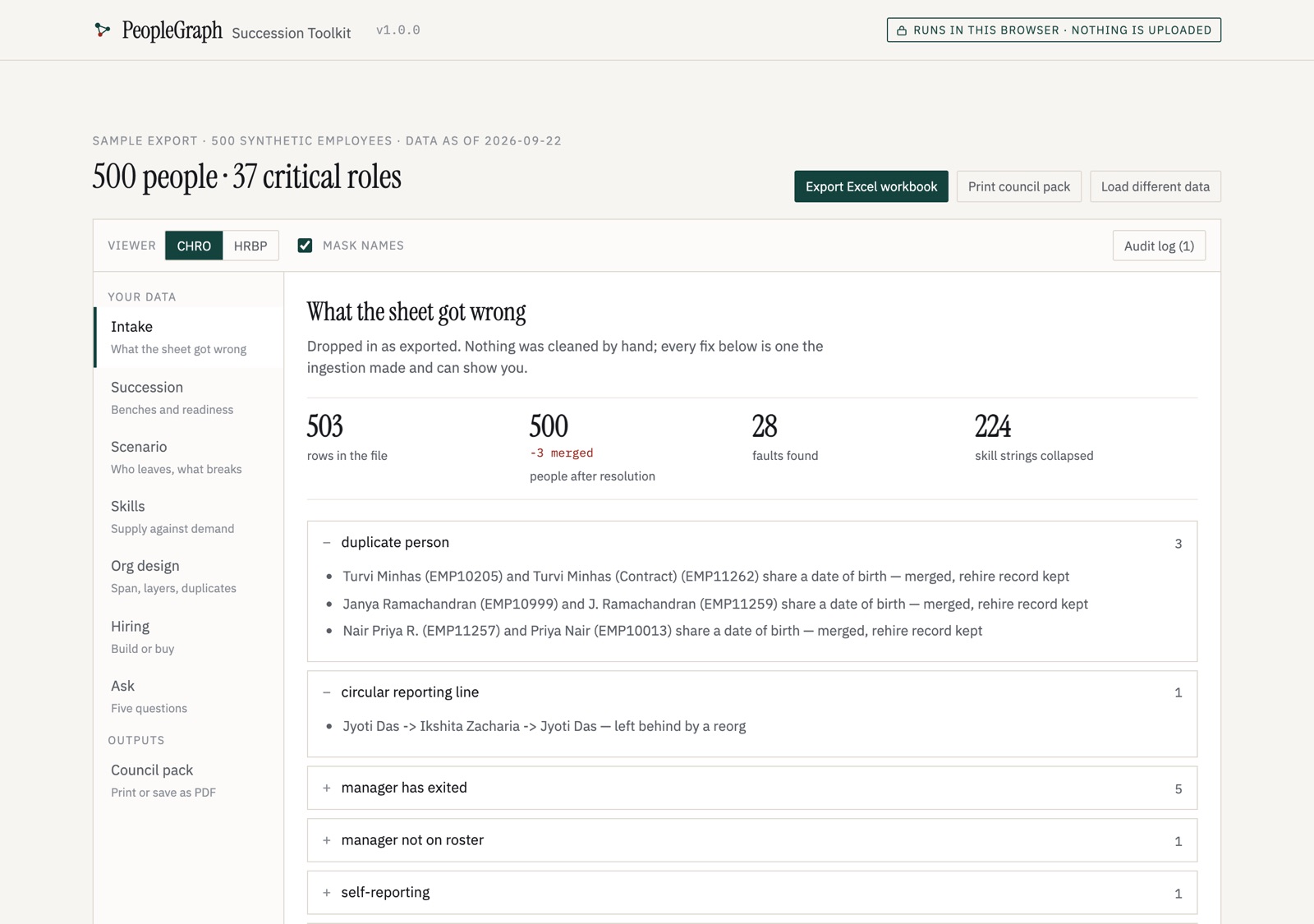
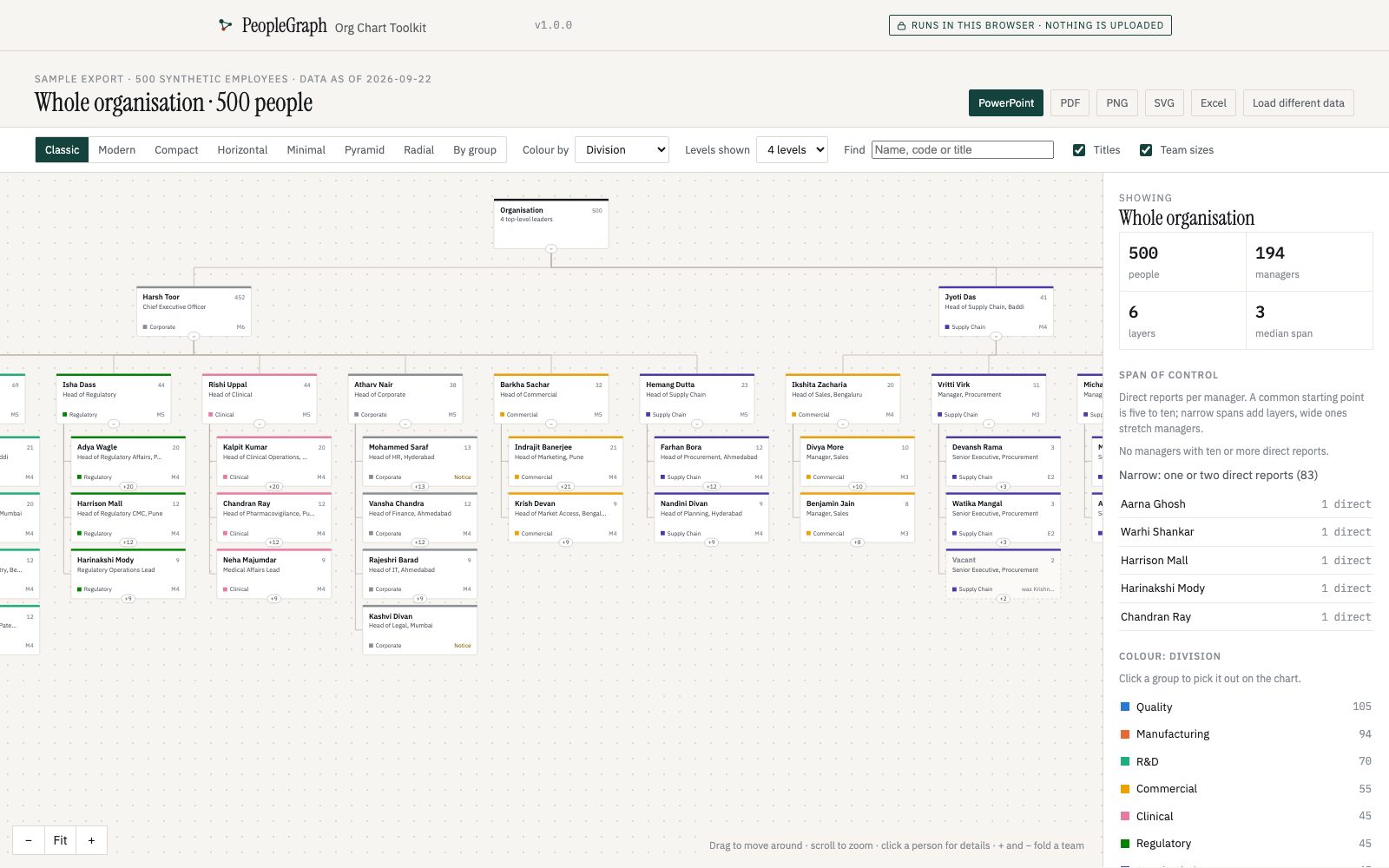
For HR teams who redraw the organisation by hand in PowerPoint every quarter, and want it right first time — from the HRIS file, with the faults fixed and the vacancies shown.
₹1,499one-time, per organisation
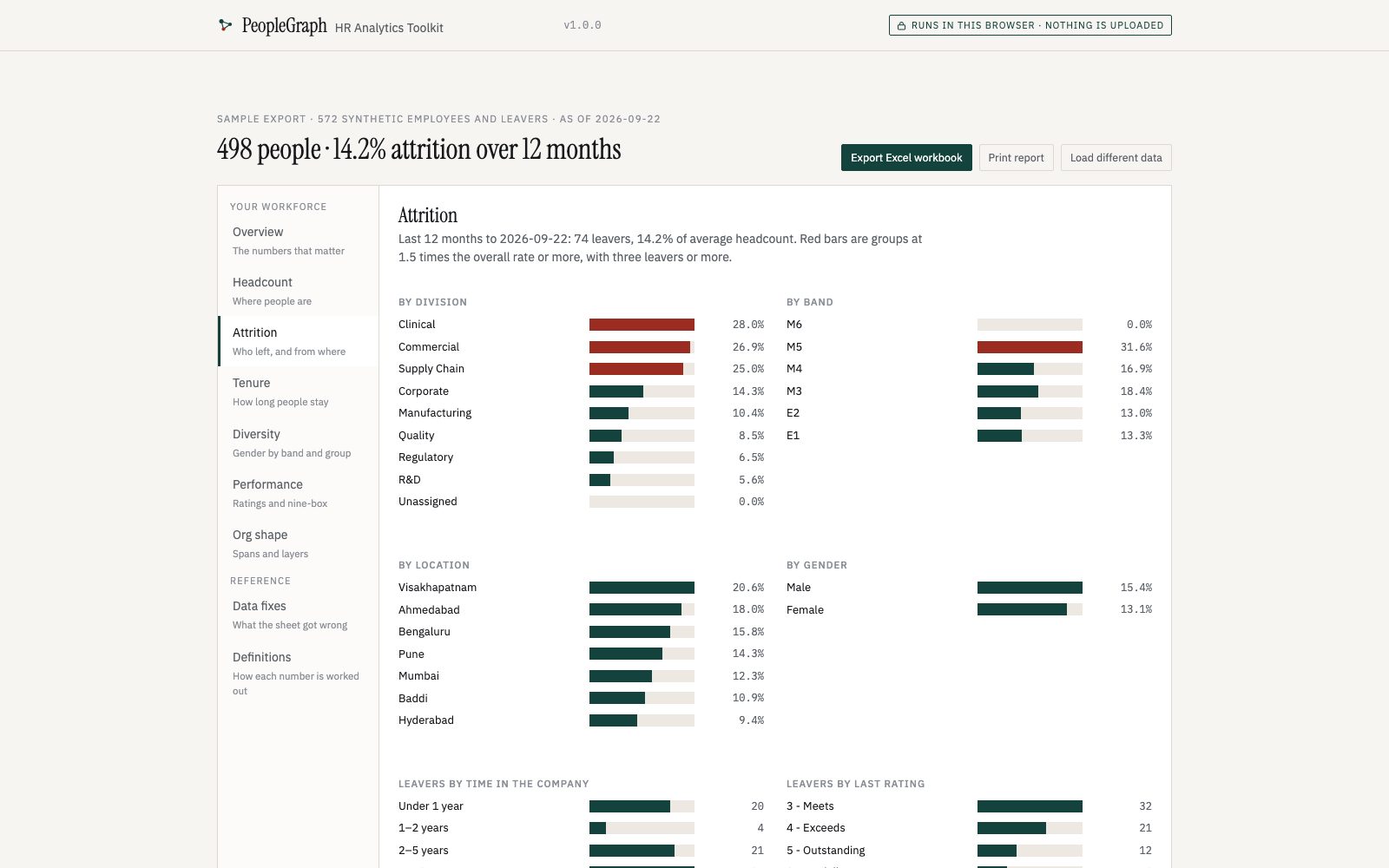
Buy and download Try the live demoFor HR teams who rebuild the same attrition and headcount numbers in Excel every month. Each figure comes with its definition, so it survives the question “how did you count that?”
₹1,499one-time, per organisation
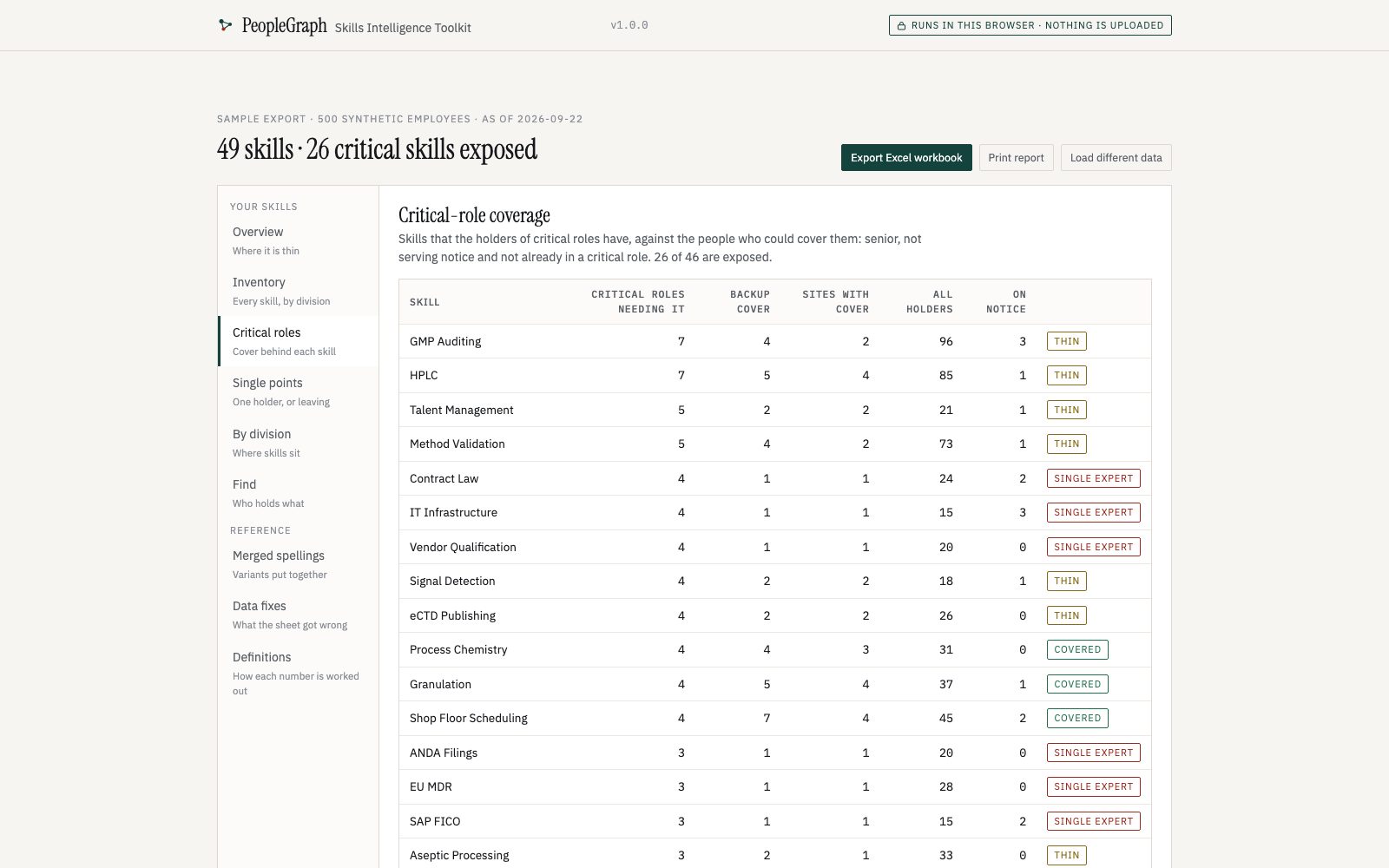
Buy and downloadFor HR and L&D teams with skills in a spreadsheet column nobody trusts: the spellings are merged, and the skills your critical roles depend on are checked against who could cover them.
₹1,499one-time, per organisation
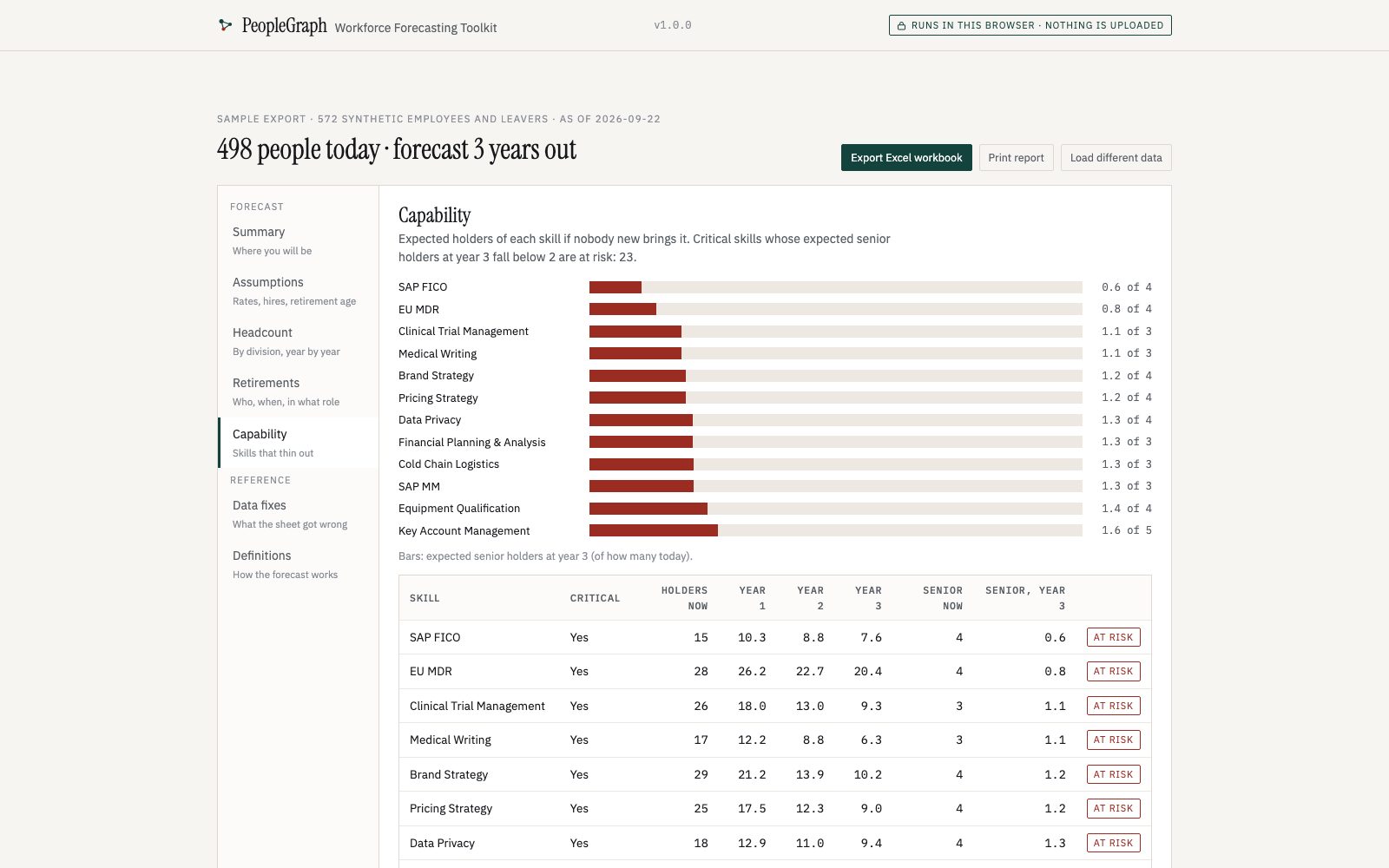
Buy and downloadFor HR and finance planning next year's headcount: real attrition per division, retirements from dates of birth, your hiring plan — and the critical skills that thin out if nobody acts.
₹1,999one-time, per organisation
Buy and download| Free · open source | Toolkits | Enterprise | |
|---|---|---|---|
| Clean and resolve an HRIS export | Yes | Yes, in every toolkit | Continuously, from the HRIS |
| Succession, org chart, HR analytics, skills, forecasting | Graph, org design, skills supply, nine-box | One toolkit each, or all five | All, kept current |
| Excel workbooks, printable reports, PowerPoint | — | Yes | Yes, scheduled |
| Column mapping and .xlsx input | Edit the code | On screen | Configured once |
| Your role architecture and skills vocabulary | — | — | Yes |
| HRIS connectors, history, multi-user, audit trail | — | — | Yes |
| What you need | Python and a terminal | A browser | A deployment inside your walls |
| Where your data goes | Stays on your machine | Stays in your browser | Stays in your environment |
| Support | GitHub issues | Named contact | |
| Price | ₹0 | ₹1,499–2,499 each; all five ₹4,999 | Scoped per organisation |
The toolkit answers succession for one export, on one machine, today. Enterprise keeps the answer true: PeopleGraph connected to your HRIS, resolving every change as it lands, with your own role architecture and skills vocabulary instead of a starter list, and succession, skills and workforce questions answered on the same governed graph.
It is deployed inside your environment, with division scoping, name masking and an audit trail built for talent councils in regulated industries.
Talk to us about EnterpriseNo. The toolkit is one web page in a zip. Unzip it, double-click it, and it opens in your browser. No Python, no admin rights, no internet connection.
Anything you can save as .xlsx or .csv with one row per employee. Your column names do not have to match; you confirm the match on screen. Only employee code and name are required everywhere; each toolkit then asks for what it uses — manager's code for the org chart, a Skills column for skills, leavers with exit dates for attrition and forecasting, band and title for succession. The same file and template work in all five.
Succession: who steps into each critical role and who on that bench may be leaving. Org Chart: the organisation drawn from the export, with reorg what-ifs. HR Analytics: headcount, attrition, tenure, diversity. Skills Intelligence: what skills you have and where critical roles are thinly covered. Workforce Forecasting: headcount and skills one to five years out. All five read the same file; all five together are ₹4,999 instead of ₹8,995.
No. Scores are a published weighted sum and fixed thresholds, so the same file always gives the same answer and a council can read the reasoning aloud. The methodology is in the download.
On a recent laptop, 10,000 rows take about 6 seconds and 20,000 about half a minute. Larger organisations run it per business unit.
Yes. The licence covers everyone in your organisation; each person runs their own copy. Consultants need one licence per client organisation.
You get a download link on screen and by email, with the licence and the getting-started guide inside the zip. Run the included sample first; it takes five minutes.
Every 1.x release is free and emailed to buyers. If the toolkit does not run the sample on your computer or does not do what this page says, email within 14 days for a full refund.
By email. The download includes a troubleshooting guide covering the problems people actually hit. There are no onboarding calls, and please never send us employee data.
Because it is what pays for the rest. The resolution engine, which does most of the hard cleaning, is open under Apache 2.0.
[email protected]
Headcount, HRIS, and what you want answered.
[email protected]
Version, browser, the step and the message. Never employee data.
GitHub issues
Bugs and export formats, on synthetic data.